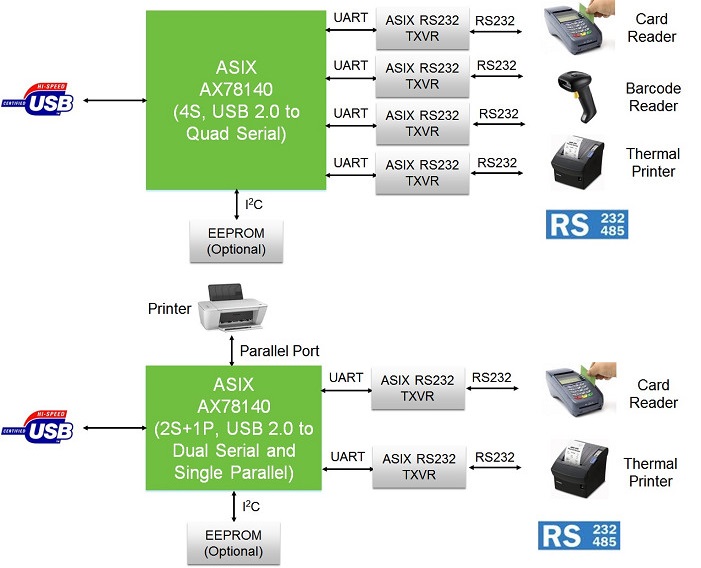
AX78140 是一款 USB 2.0 四埠 UART/序列埠與並列埠橋接控制晶片,整合 USB 2.0 控制器與 PHY,並提供四個高速序列埠及一個並列埠。它支援兩種運作模式:4S(USB 轉四埠 UART/序列埠)與 2S+1P(USB 轉雙埠 UART/序列埠加單埠並列/LPT埠)。AX78140 可適用於多種 USB 2.0 I/O 橋接產品應用,包括 USB 轉 UART/RS‑232/RS-422/RS‑485 串列通訊卡、USB Parallel 並列埠 (LPT) 通訊卡、USB 資料擷取 (DAQ) 通訊卡、工業電腦與自動化控制系統、測量與儀器系統、醫療設備,以及 POS 終端機。
AX78140
USB 2.0轉多I/O (4S, 2S+1P) 控制器
Add Favorites
簡介
規格:
● 一款USB 2.0轉多I/O (4S, 2S+1P) 控制器,提供4S、2S+1P UART/序列埠與並列埠橋接功能
應用目標:
> USB UART/RS‑232/RS-422/RS‑485 串列通訊卡
圖表
開發板
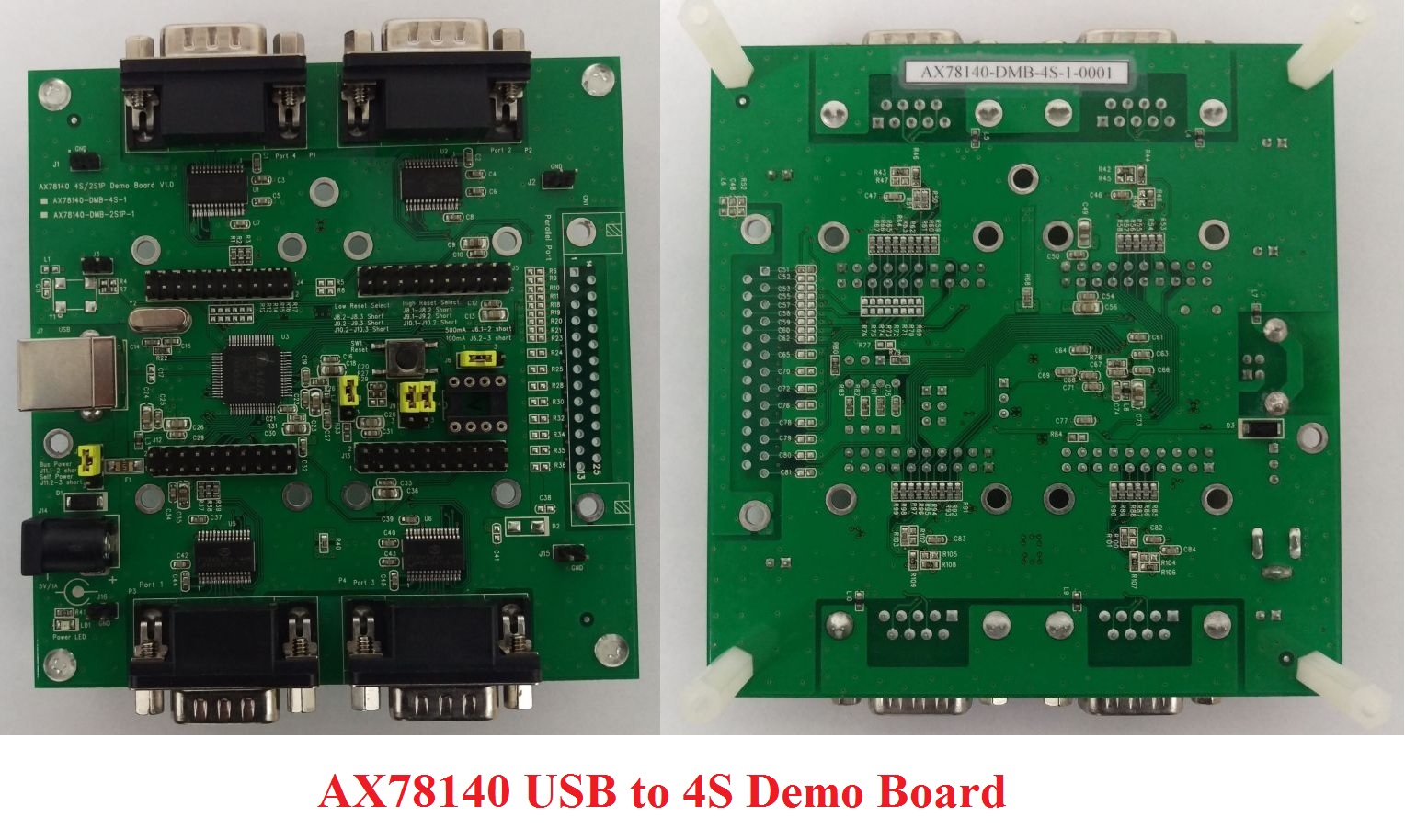
AX78140 USB 2.0轉4序列埠評估板 (AX78140-DMB-4S-1)
AX78140 USB 2.0轉4序列埠評估板,提供客戶用來驗證AX78140 USB 2.0轉4序列埠功能。
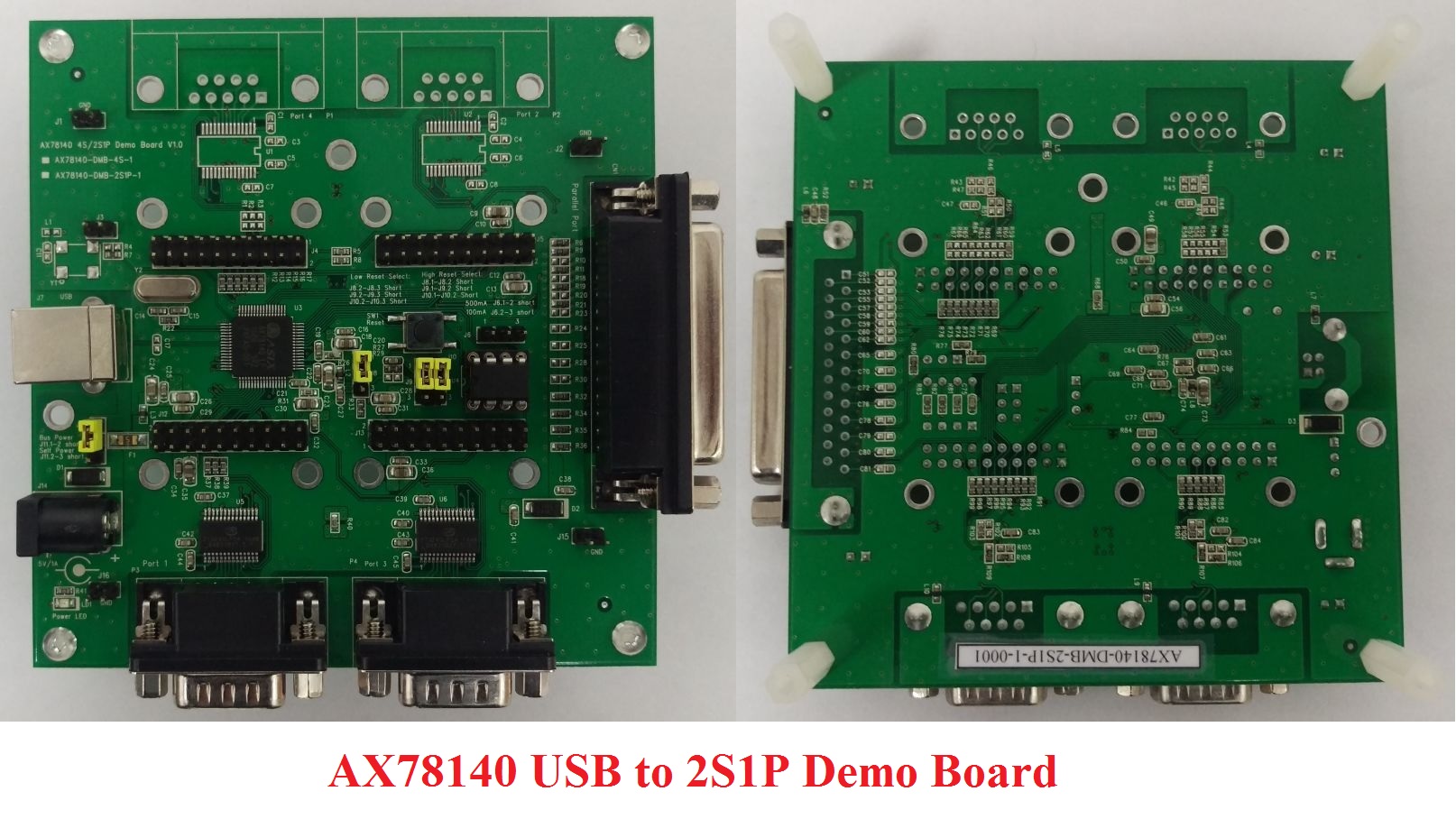
AX78140 USB 2.0轉2序列埠+1並列埠評估板 (AX78140-DMB-2S1P-1)
AX78140 USB 2.0轉2序列埠+1並列埠評估板,提供客戶用來驗證AX78140 USB 2.0轉2序列埠+1並列埠功能。
常見問題
硬體設計注意事項
-
Is AX78140 IC pin-to-pin compatible to MCS7840 IC?
Yes, AX78140 IC is pin-to-pin compatible to MCS7840 IC.
-
Where can I obtain the latest AX78140 datasheet, reference schematic and other hardware design archives?
Please register MyASIX membership (http://www.asix.com.tw/RegLogin.php?mod=thisis) and then download the latest AX78140 datasheet, reference schematic, PCB layout guide, etc. from AX78140 Product web page directly.
-
Can ASIX help me to review my own AX78140 schematic and PCB layout?
Yes, please deliver your own AX78140 schematic and PCB layout files to ASIX’s Support (support@asix.com.tw) for further review before making your own AX78140 PCB board.
-
Is the I2C EEPROM required for AX78140 4S/2S1P applications?
The I2C EEPROM is required for AX78140 2S1P applications and is optional for AX78140 4S applications.
-
How to program AX78140 I2C EEPROM in-circuit?
The AX78140 supports a Windows EEPROM Utility to program the I2C EEPROM in-circuit.
-
Does ASIX support RS-232/RS-485 transceivers solutions?
Yes, ASIX also supports different RS-232/RS-485 transceivers solutions (i.e. Zywyn RS-232/RS-485 transceivers products). Please visit ASIX I/O Connectivity RS-232/RS-485 Transceivers Products Web page for more details.
-
Does AX78140 USB to parallel port support ECP/EPP modes?
No, AX78140 USB to parallel port doesn’t support ECP/EPP modes.
軟體設計注意事項
-
Can AX78140 install the original MCS7840 drivers directly?
es, you should be able to install the original MCS7840/MCS7820 drivers on AX78140 applications directly. If you have any problems, please download the latest AX781x0 drivers from AX78140 Driver Download web page instead. The latest AX781x0 drivers supports all AX78140/AX78120/MCS7840/MCS7820/MCS7810 applications.
-
Where can I obtain the latest AX78140 drivers?
Please visit AX78140 Driver Download web page to download proper drivers for your AX78140 target applications.
-
How to change the COM port number of AX78140?
Yes, we can change the COM port number by using a drop down list located in AX78140 Windows COM Port Properties. To change the COM port number, go to "COM Port Properties => Features => COM Port Number".
-
How to change the LPT port number of AX78140?
Yes, we can change the LPT port number by using a drop down list located in AX78140 Windows LPT Port Properties. To change the LPT port number, go to "LPT Port Properties => Features => LPT Port Number".
檔案下載
硬體設計文件
軟體 & 工具
Linux kernel 5.x/4.x/3.x/2.6.x Driver
For all Android systems, Linux kernel 2.6.14 and laterWindows 11 64-bit Driver
For x64 CPU platform, HLK/WHCK certifiedWindows 11 ARM 64-bit Driver
For ARM x64 CPU platform, HLK/WHCK certifiedWindows 8.x 32-bit Driver
For x86 CPU platform, HLK/WHCK certifiedWindows 8.x 64-bit Driver
For x64 CPU platform, HLK/WHCK certifiedWindows 7/Vista/XP 32-bit Driver
For x86 CPU platform, WHCK certifiedWindows 7/Vista/XP 64-bit Driver
For x64 CPU platform, WHCK certified